CHeKT Web Based End User App

CHeKT Web Based End User App

CHeKT Web Based End User App Guide

Overview

Info
The CHeKT Web-Based App allows customers to monitor and control their home or business in real-time from any internet-connected PC. CHeKT's interactive security and video monitoring solution provides instant awareness and remote control for the places that matter most.

Notes
⚠️ Important: The Web App is available exclusively to customers of dealers on the Professional and Premium Dealer Plans. It is not available on the Basic Plan.


Prerequisites

  • Active CHeKT customer account
  • Dealer enrolled in the Professional or Premium Plan
  • Internet-connected PC
  • Customer login credentials
    (To create a login for your customer, please click here)


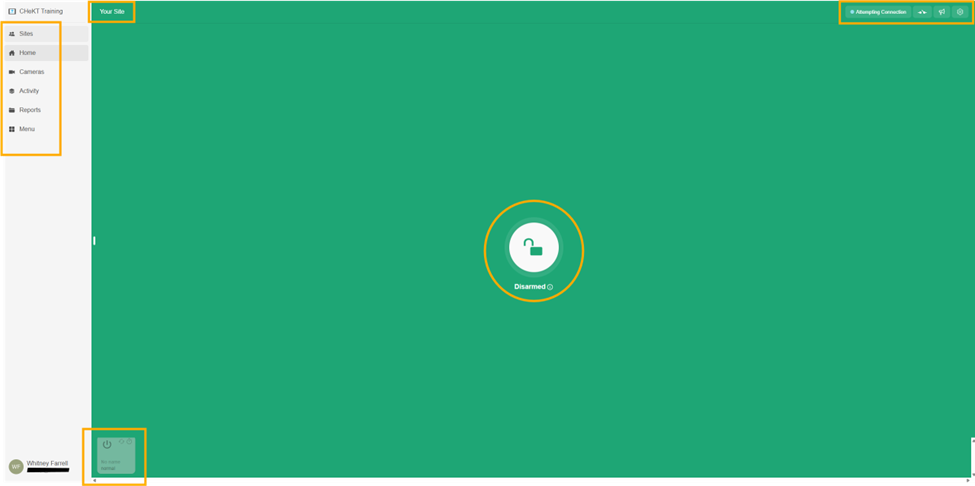
Site Indicator

Displays the site you are currently accessing, making it easy to differentiate between multiple sites at a glance.


Sites Tab

Navigate between multiple sites you are an App User of. This tab also displays the current arming state of each listed site.


Home Tab

Returns you to the Home Page, where you can perform the following actions:

Function
Description
Arm / Disarm
Arm or disarm the site remotely
Activate a Relay
Trigger a connected relay
Perform a Broadcast
Send a message to the site


Steam Connection Indicator
If your stream connection times out, you might need to optimize the stream. Simply click the stream connection, Try Reconnect, and the stream will attempt to force a connection


Relay Functions

Trip relays in either of the following modes:

  • Latch
    — Relay remains engaged until manually released
  • Momentary
    — Relay triggers briefly and resets automatically


Broadcast Function

Send one of the following message types to the site:

  • Prerecorded messages
  • Live Broadcast
  • Text-to-speech messages


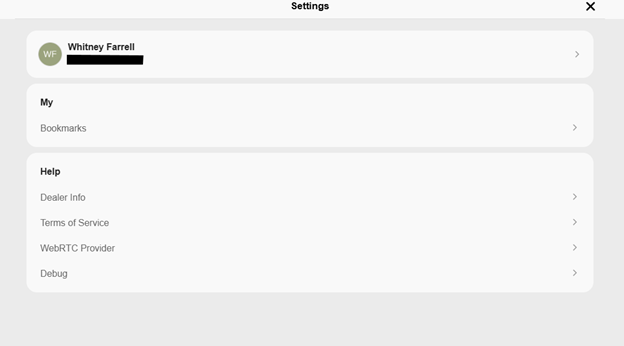
Settings
Access your bookmarks and additional help information.



Cameras Tab

View live camera feeds for your current site.

Accessing Camera Settings:

  • Click the three-dot menu (⋮) on any camera tile to access its individual settings


  • Alternatively, click directly within a camera's view to open the singular live feed. Hover your mouse over the live feed to reveal additional options in the bottom-right corner of the display

Display Features
(Top Row — Left to Right)

Feature
Description
Stretch to Fit
Stretches the screen to fit the image
Wide View Mode
Widens the screen for widescreen video
Select Video Quality
Toggle between Medium Quality(lower bandwidth, lower resolution, lower frame rate)andHigh Quality(higher bandwidth, higher resolution, higher frame rate)
Volume
Controls volume if the camera has a built-in microphone
Full Screen
Expands the display to fill the entire screen

Camera Functions
(Bottom Row — Left to Right)

Function
Description
Events
View prior recorded video events
Take a Screenshot
Capture a still image from the live feed
Talk
Initiate a talkdown to the site
Open Relays
Engage relays attached to the camera
Timelapse Events
30-second compressed clips for every hour of footage (Optional — available via VMS: Video Vault Plus)
Settings
Access individual camera settings


Info
Optional Camera Functions

Function
Availability
PTZ Controls
Available for PTZ-enabled cameras only
Playback
Available by enabling VMS Video Vault


Activity Tab

Opens the Activity Center, where all site events are logged. Includes enhanced filtering and search tools to help you quickly locate the information you need.


Reports Tab

Access Incident Reports
generated by the Dealer for the site you are currently viewing.


Access miscellaneous settings and additional information for your account and site.


    • Related Articles

    • CHeKT End-User App Guide & Support

      End-User App Guide With the end-user CHeKT app your customer can now monitor and control their home or business in real-time and from anywhere. CHeKT's interactive security, video monitoring and home automation solution gives your customer instant ...
    • Bridge Relay and the End-User App

      Bridge Relay Configuration and End-User App Navigation With the release of our Version 2 Hardware Model, the CHeKT Solution incorporated the ability to interface with a myriad of external devices by way of a simple relay output. Once configured, the ...
    • VMS Video Vault – Site-Based Cloud Video Recording & Storage Services

      Overview CHEKT's VMS Video Vault is a site-based cloud video recording and storage solution. Each site can be individually assigned a Video Vault plan, ensuring flexible and scalable storage options tailored to its unique security needs. Video Vault ...
    • CHeKT Contact ID Library Support Article

      Here is a list of all Contact ID Alarm codes you will need in your automation platform to support CHeKT. The Download is available below.
    • How to Register a CHeKT Bridge

      Registering a CHeKT Bridge Links to additional steps: Creating a Site: Creating a New Customer Site Registering Cameras: Adding Cameras to a CHeKT Bridge 1. Registering a CHeKT Bridge Once you have created a customer account site you can proceed to ...